
If you run a large PrestaShop store, old optimization methods might not just stop working—they could get your site penalized. Let’s break down the new rules of the game and look at how to align your business with modern ranking algorithms.
1. Crawl Budget: Why Are Bots “Ignoring” Your Products?

Every search bot has a limited amount of time and resources to scan your website—this is known as the crawl budget. If you have 20,000 products in your catalog but Google has indexed only 3,000, your crawl budget is being wasted.
The main culprit behind this issue in e-commerce is uncontrolled faceted navigation. When a shopper selects multiple attributes (for example: Size L + Blue + Price from $50 to $100 + Brand), PrestaShop’s native module can generate a unique link for every single combination. To a bot, this looks like millions of new, virtually identical pages. It gets trapped in these endless loops, burns through its entire crawl limit, and leaves without ever reaching your actual product pages.
Work with a developer to configure smart SEO filters. All strictly technical combinations (like sorting by price or size grids) must be completely blocked from crawling using robots.txt rules or implemented via JavaScript/AJAX without generating indexable URLs. Using the noindex tag here is useless—the bot will still waste resources just to visit the page and read that tag. You should only open filter landing pages that generate real search demand (for example, “Red Leather Wallets”).
2. The Reality of WebP: How to Optimize Images Properly
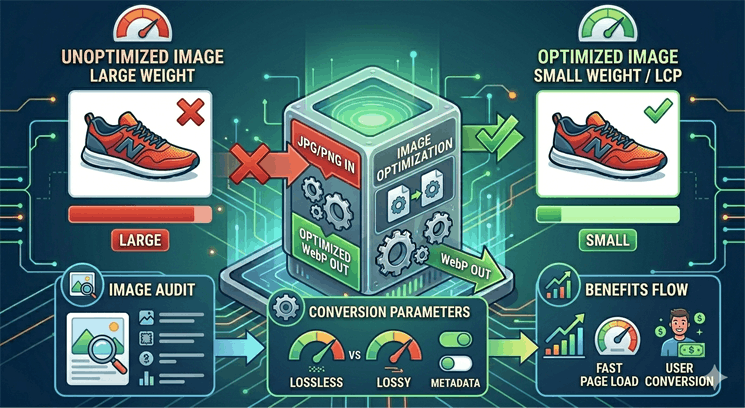
Search engines, especially Google via its PageSpeed Insights tool, strongly demand the use of Next-Gen formats like WebP or AVIF. Many store owners install the first automatic conversion plugin they find and assume the problem is solved.
However, there is a technical catch. Native PrestaShop modules often rely on basic server-side PHP libraries (such as GD), which convert images incorrectly. They either over-compress them, ruining the quality, or generate files that weigh just as much as the original JPEGs. Google’s bots don’t just look for a .webp extension in the code; they evaluate the actual data loading speed via the LCP (Largest Contentful Paint) metric.
Why a proper transition to WebP is critical:
When compressed using proper software tools, WebP utilizes advanced pixel prediction algorithms. This allows it to package graphics with transparency (replacing heavy PNGs) about 26% better, and product photos 30% more efficiently than JPEG—with no visible loss in quality.
The lighter the physical file, the faster the page renders on shoppers’ smartphones, directly boosting mobile search rankings.
Do not trust “blind” conversion. Real optimization happens when your images pass through professional server-side compression utilities (like cwebp or imagemin) integrated directly into the PrestaShop backend. This delivers the perfect balance: a microscopic file size for instant loading and a green zone in webmaster panels.
3. GEO and AI Search: How to Get Google Gemini to Recommend Your Store?

Search engine results pages (SERPs) are shifting right now. Traditional SEO is giving way to GEO (Generative Engine Optimization)—optimization for generative AI search engines. Google is actively rolling out its AI Overviews feature.
Imagine a user typing a long, conversational query: “I need waterproof running shoes for wide feet under $150.” The search engine no longer just lists links. Google’s AI analyzes the market on its own, generates a comparative table, and attaches cards from specific stores. Your goal is to make the AI choose your PrestaShop store.
Google’s AI algorithms operate on RAG (Retrieval-Augmented Generation) technology. The neural network doesn’t pull answers out of thin air; it scans trusted web pages on the fly, gathers facts, and provides a response complete with citations and links to the original sources.
How to get featured in AI responses?
It is difficult for an AI to pull a single, isolated product out of a vacuum. It is much easier for it to scan your category page if it contains a structured guide or curated list (e.g., “Top 5 Models for Wide Feet This Season”).
Google looks for clear consumer triggers. If your website explicitly states “Official 2-Year Warranty” or “Free Shipping over $50”, the AI will scrape this data and add it to your product description right inside its answer. The key is that this information must be formatted as HTML text, not baked into a banner image.
Utilizing Schema.org markup (Product, AggregateRating, and Offer types) serves as a ready-made cheat sheet for AI. It won’t have to decipher your design layout; it instantly extracts the price, availability, and specs in a machine-readable format.
4. AI Automation: Fighting “Thin Content” Without Bloating Your Payroll
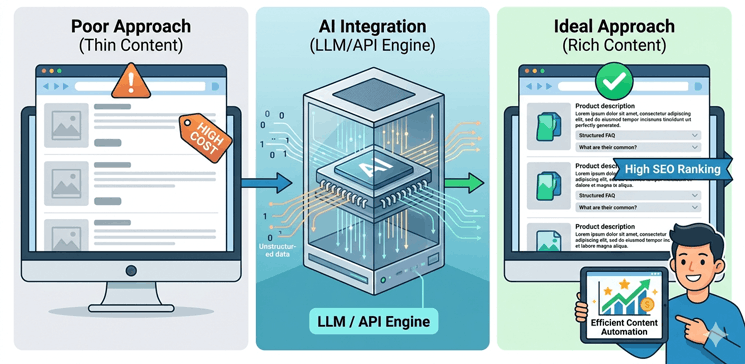
Google easily detects text written just for the sake of filling space and penalizes websites for Thin Content. If your catalog has thousands of products with empty descriptions or generic technical specifications copied straight from the supplier, those pages will drop in rankings.
But how do you write unique copy for a massive catalog without spending a fortune on copywriters? The solution is integrating Large Language Models (LLMs) via the ChatGPT or Gemini API directly into your PrestaShop backend.
When your automation modules are configured correctly, you solve two problems at once:
The AI is strictly bound by system prompts to use only real product attributes fetched from your database, preventing it from inventing non-existent features.
Instead of long, useless SEO text walls, have the AI generate answers to common customer questions for your category pages. Search bots love this type of content and frequently feature these blocks directly in search results, driving up your CTR.
Looking into the Future: What Should You Prepare For? The world of web development and SEO never stands still, and the future landscape of e-commerce is already taking shape:
In the coming years, online stores will increasingly be visited not by human shoppers, but by their personal AI assistants. A user will tell their AI: “Find the best price for an original 2025 Suzuki S-Cross air filter and order it.” The AI agent will surf the web, scan available stores, check API access or site structures, and complete the purchase. Stores that are blocked from bots or have messy architectures will simply cease to exist for this market segment.
Developers are already actively discussing and adopting a new trend: placing a special llms.txt file in the root directory of a website (similar to robots.txt). This file provides a brief text summary of the website in Markdown format, tailored specifically so that language models don’t waste resources rendering heavy UI layouts, but can instantly grasp your core business offers. The first e-commerce businesses to prepare for this shift will reap the rewards.
Checklist for PrestaShop Owners: Where to Start Your Audit?
Open Google Search Console and check how many of your pages are actually indexed. If the number is suspiciously low compared to your actual inventory, task your developer with an audit of your crawl budget and faceted navigation.
Run a PageSpeed Insights test specifically for mobile devices. Pay close attention to the INP (Interaction to Next Paint) metric—it measures how quickly your site responds to a user’s click (e.g., when expanding a filter or clicking “Add to Cart”).
Ensure that bots see your prices and reviews in a structured format, and start deploying smart AI content generation based on your products’ real technical specifications.
SEO today is not about tricking algorithms; it is about building a fast, technically sound, and genuinely helpful website. Make your PrestaShop store seamless for both machines and humans, and search bots will naturally lift your business to the top of the search results.